
ArticleUpdated: September 6, 2026
Useful hotkeys in Photoshop
In short
Evgenia Chernova shows five commands worth putting on your own Photoshop shortcuts. Flip the canvas, convert the piece to black and white, lock a layer's pixels, open a duplicate window and call up smudge — with the settings path for each one.

2D artist (illustrator)
Hotkeys are indispensable for a digital artist: they allow you to speed up the work process and make it comfortable. Evgenia Chernova, curator of the 2D graphics course, has compiled a list of commands and tools for which you can set up hotkeys.
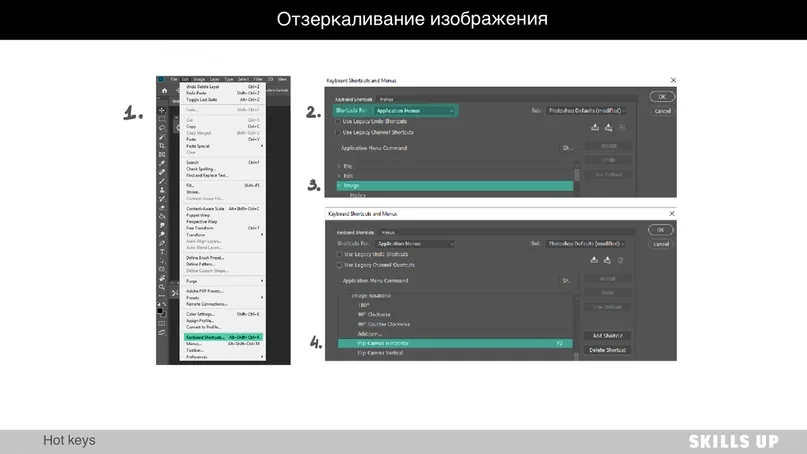
1. Mirroring
Mirroring an image is a very useful trick, it helps to take a fresh look at the drawing and correct mistakes. Edit → Keyboard Shortcuts → Shortcuts For: Application Menus → Image Rotation → Flip Canvas Horizontal
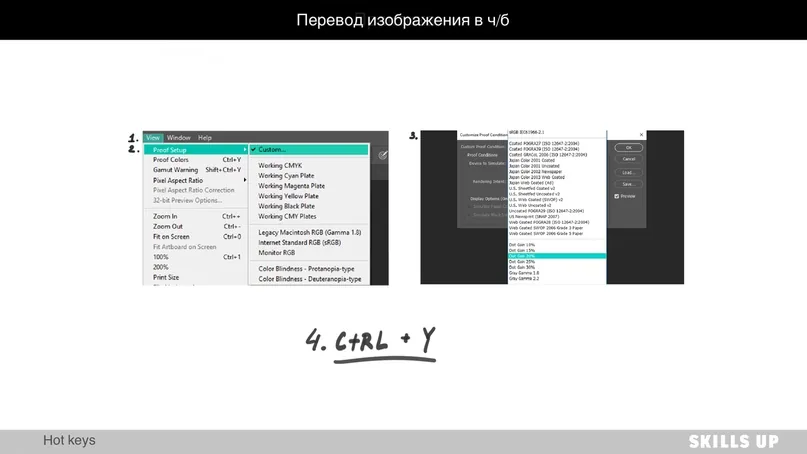
2. Black and white conversion
When working with color, it is important to monitor the tone difference, since our eye primarily reads tone rather than the color of the object. Converting the picture to black and white helps to see the tone “stuck” and correct the work. It is set up once, and then the ctrl+y combination translates the work into black and white and back. View → Proof Setup → Custom → Device to simulate → Dot Gain 20%. Then use the hotkey Ctrl+Y.
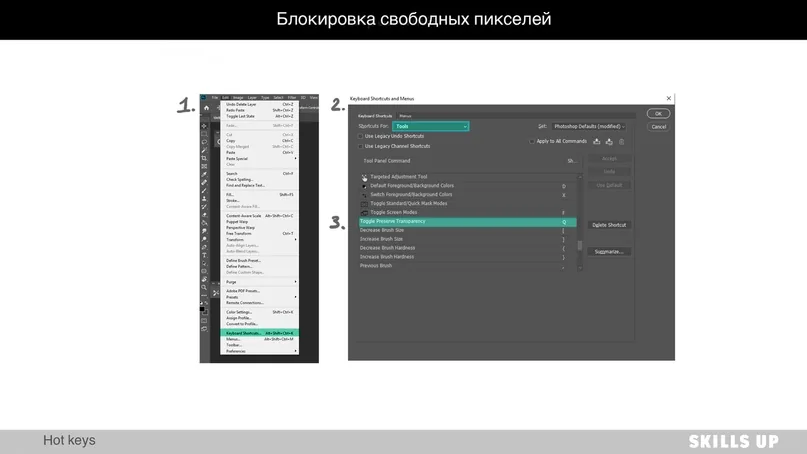
3. Layer lock on Q
Blocking pixels is a fairly frequently used function, and in order not to strain your fingers лишний раз and save a little time, you can put it on a key that is convenient for you. Edit → Keyboard Shortcuts → Shortcuts For: Tools → Toggle Preserve Transparency
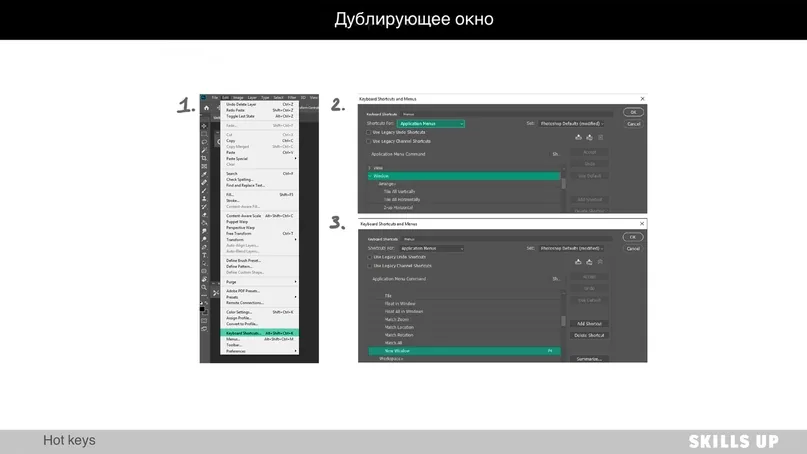
4. Window duplicate
It often happens that while working with an image, we get bogged down in the details and stop monitoring the work as a whole. To avoid this, it is worth creating a small duplicate window and looking at the drawing in a reduced form.Edit → Keyboard Shortcuts → Shortcuts For: Application Menus → Window → New Window
Related courses
All courses
from 5 000 ₽
-75%
Photoshop for the artist
20 000 ₽5 000 ₽
Learn more

from 4 250 ₽
-75%
Game interface design
17 000 ₽4 250 ₽
Learn more

from 18 354 ₽
-77%
3D illustration in Blender
79 800 ₽18 354 ₽
Learn more
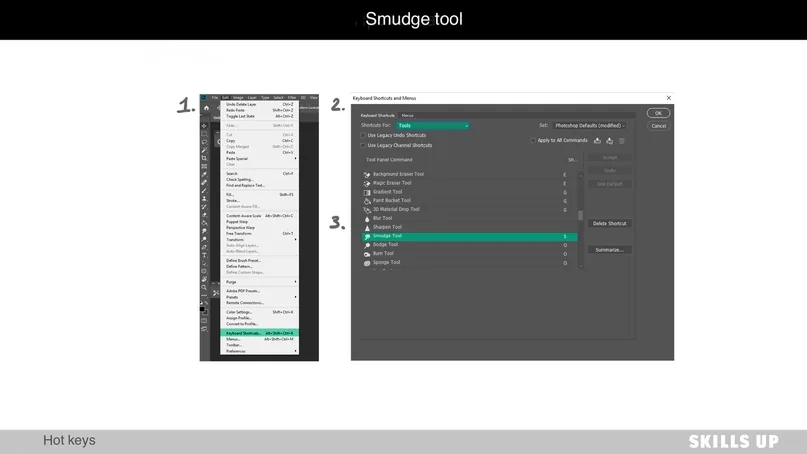
5. Smudge tool on S
The “Finger” tool is a Photoshop boon that gives us the effect of a soft touch and also allows you to easily blend anything.Edit → Keyboard Shortcuts → Shortcuts For: Tools → Smudge Tool
Related materials
Article
Useful exercises for drawing in 2D
September 18, 2023
Tutorial
3D for 2D illustration: A comprehensive guide for artists
December 26, 2024
Tutorial
Digital painting in Photoshop
August 12, 2024

Article
Frontal perspective in drawing
October 1, 2025

Article
Statics and dynamics in drawing: creating mood and movement
March 24, 2025

Article
About color and light in simple language: a comprehensive guide
March 21, 2025