
TutorialUpdated: September 6, 2026
How to draw magical fire
In short
Magic fire rests on three things — a confident flame shape, brush settings and blend modes. Drawing fire starts with a rough outline using a pressure brush, then come the glow layers running from the hot core outwards and the light it throws on its surroundings.

2D artist
User:
In this lesson from the Skills Up School team, we will learn how to draw magical fire. It's not just a flame, it's mood, emotions and magic in your drawing. Let's add a bit of magic, make it bright, lively and unforgettable!
The secret of magic is this: confident work with shape + brush settings + a couple of blending modes — and magic will happen! Let's go.
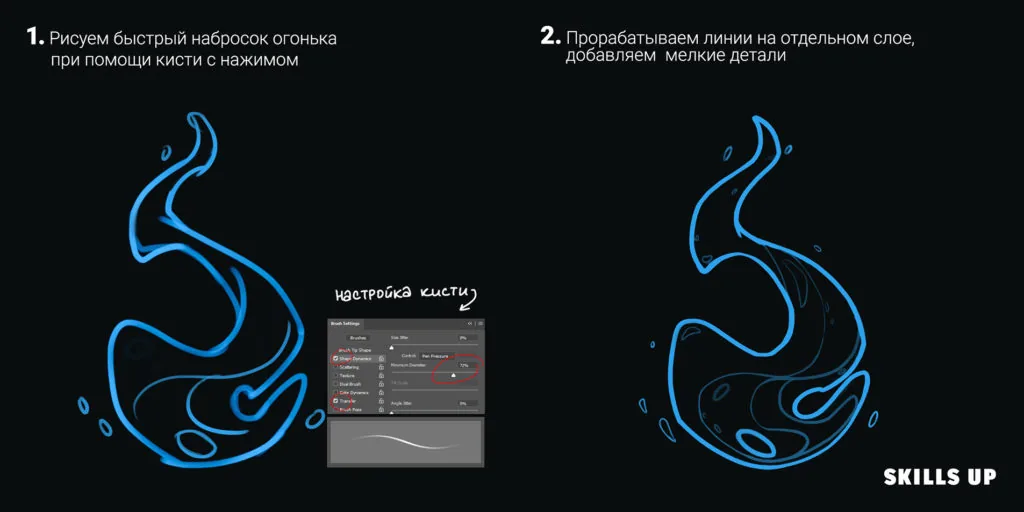
1. Quick sketch of the shape
Start by sketching the general outlines of the fire.- Use a brush with a pen pressure effect to create smooth lines that resemble flames.
- Add a few "waves" and chaotic swirls for more effect.
2. Refining the lines
On a new layer, detail the lines.- Draw thin curls and add sharp flames.
- Make sure the lines are of different thicknesses: thinner for details and thicker for the main flame.
3. Gradients and base
- Fill the main silhouette of the fire with a gradient: from bright yellow in the center to red-orange at the edges.
- Use a soft brush to create smooth transitions.
Related courses
All courses
from 3 750 ₽
-25%
My first figure
5 000 ₽3 750 ₽
Learn more

from 4 950 ₽
-45%
Book illustration: The first page
9 000 ₽4 950 ₽
Learn more
from 4 950 ₽
-45%
Prop concept: render and atmosphere
9 000 ₽4 950 ₽
Learn more
Tip:For a magical effect, add unexpected colors, such as blue or purple, to the edges of the flame.
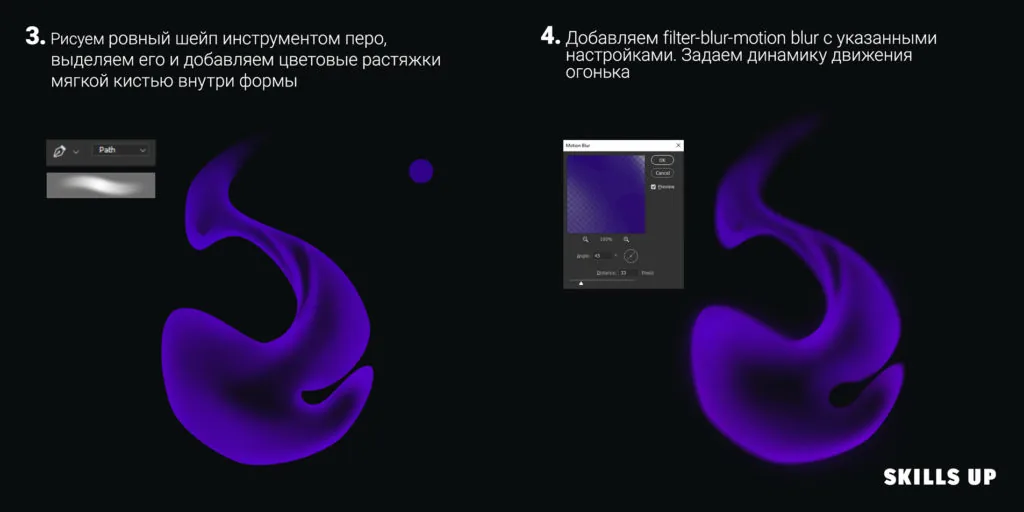
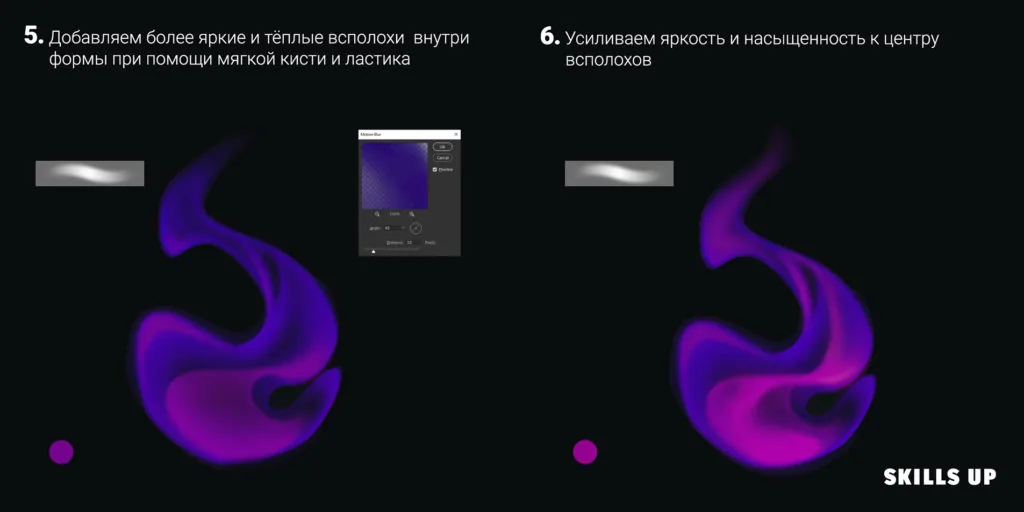
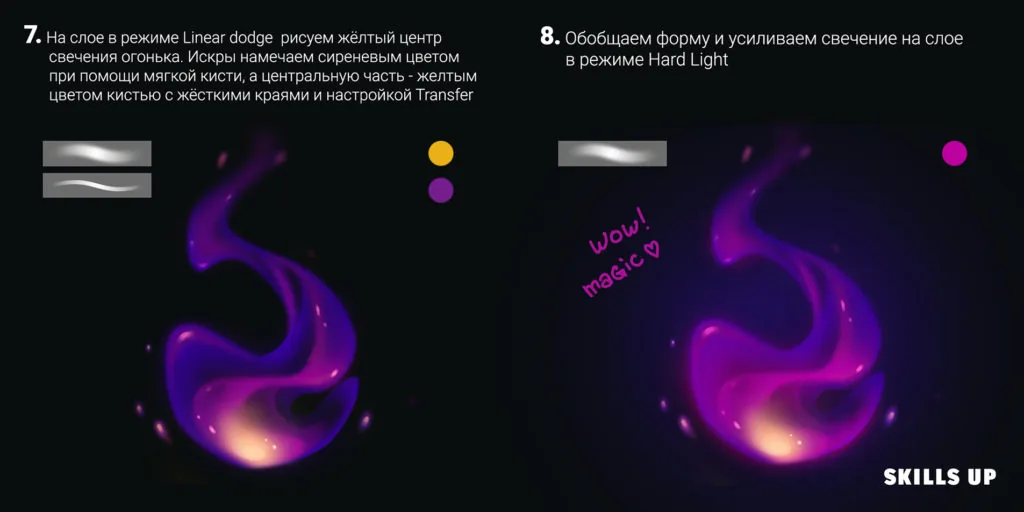
4. Blur and movement
- Apply motion blur ("Motion Blur") to a copy of the layer to add dynamics.
- Light blur will help create the illusion of vortices inside the flame.
5. Highlights and brightness
- On a new layer in "Overlay" mode, add light highlights in the center of the flame.
- Work on the edges of the flame with brighter strokes to give it "sparkle".
6. Sparks and details
- Add small sparks around the fire using a brush with low opacity.
- For realism, make the sparks of different sizes, some slightly blurred.
7. Depth and textures
- Add texture to the fire to make it look more voluminous.
- For example, use a brush with noise or a "charcoal" texture to diversify the flame.
8. Final touches
- Check how the fire looks against the background. Adjust the contrast and saturation.
- Add a light glowing aura around the flame.
Tricks, tips and tricks for magical fire
- Color experiments:Don't be afraid to use unusual color combinations: purple with pink, blue with gold. Magical fire can be any color!
- Light and reflection:Add a reflection of the light from the fire onto nearby objects. This will make the scene more realistic.
- Variety of shapes:Each flame is unique! Add swirls, "gaps" or even individual tongues that break away from the main fire.
- Application of textures:Mix different textures to make the fire look alive. For example, use a "fog" brush to create haze around.
- Smooth gradients:The more smooth transitions in the flame, the more realistic it will look.
- Adding magical elements:Try to include sparks in the form of stars, symbols or even animal silhouettes in the fire — this will add индивидуальности.
Related materials
Tutorial
How to draw hair with a pencil
July 30, 2026
Tutorial
How to draw a chest
November 29, 2024
Tutorial
Drawing stones
March 10, 2025
Tutorial
How to draw a child?
January 13, 2025
Tutorial
How to draw a torso
December 18, 2024
Article
3 tips for a beginner character artist. How to draw emotions
September 18, 2023